
Screenshots

App details
- Updated
- Apr 16, 2009
- Language
- English
- Developer
- FlameRobin Team
- Category
- Mobile
SoftPas in:
This product is also available in the following languages:
About FlameRobin
Download FlameRobin – Firebird database, GUI tool, database management, SQL editor, user management, table creation, database administration
Overview
FlameRobin is a graphical user interface (GUI) designed specifically for managing Firebird databases. It streamlines common database operations by replacing complex command-line interactions with intuitive visual tools. This makes it especially valuable for users who are new to database administration or prefer a visual workflow over text-based commands. The app serves as a bridge between technical database functions and user accessibility, enabling efficient management of database schemas, user accounts, and query execution. Its primary purpose is to simplify tasks such as creating tables, writing SQL statements, managing users, and monitoring database structures—all within a single, cohesive interface.
FlameRobin targets developers, database administrators, and IT professionals working with Firebird databases. It is particularly beneficial for teams that require rapid schema changes, frequent query testing, or user access control without the learning curve of CLI tools. The application is ideal for both standalone projects and integrated development environments where database handling is a recurring task. Although the developer background is not detailed beyond the team name, FlameRobin has been maintained since its release in 2009, indicating a stable and long-standing presence in the database tooling ecosystem. Its continued relevance underscores its reliability and utility in niche technical workflows.
Key Features & Functionality
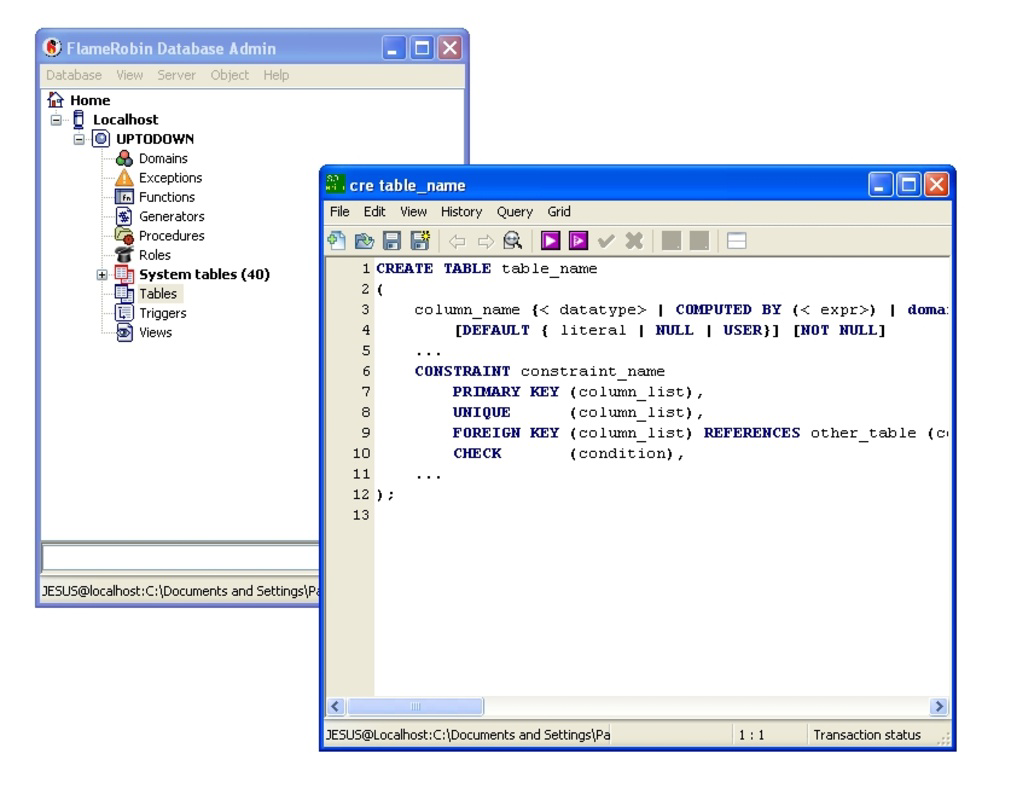
- Graphical Interface: FlameRobin provides a clean, organized interface that allows users to interact with Firebird databases visually. Instead of memorizing command syntax, users can navigate databases, tables, and procedures through menus and tree views, reducing the likelihood of input errors.
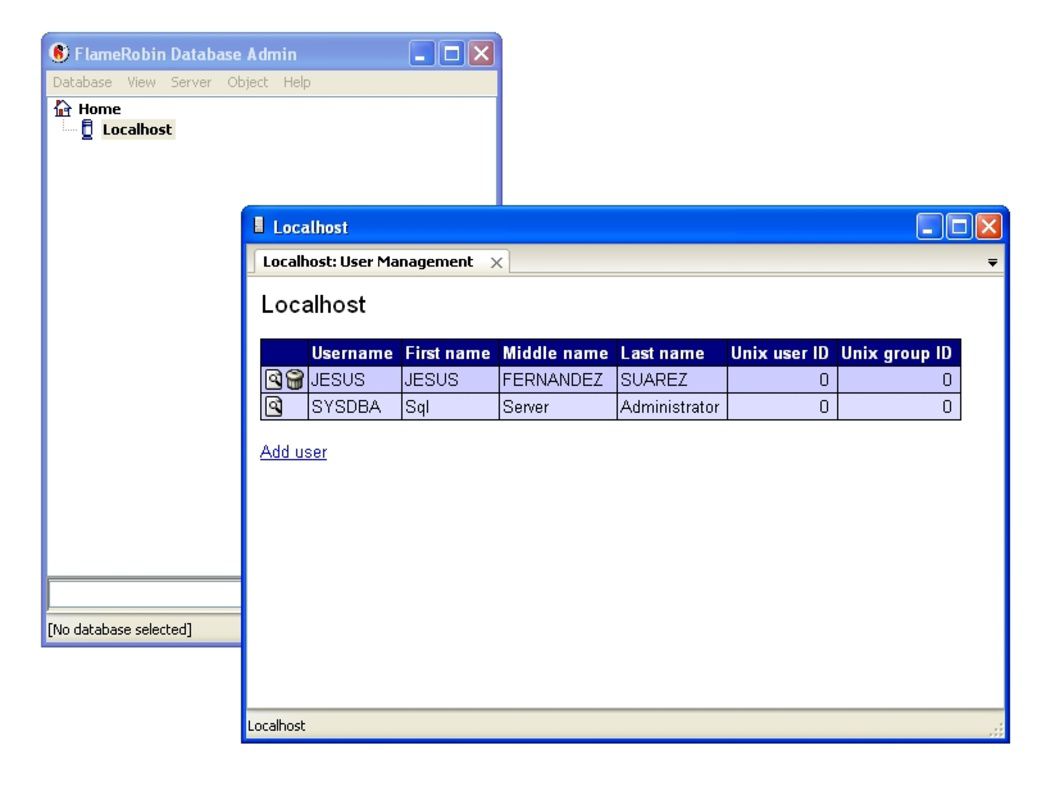
- User Management: The tool includes built-in functionality for creating, editing, and deleting user accounts. It supports access to SYSDBA credentials, simplifying initial setup and ongoing user administration, which is crucial for securing database environments.
- SQL Editor: Equipped with a powerful SQL editor featuring autocomplete and syntax highlighting, FlameRobin enables users to write, test, and execute queries efficiently. This enhances productivity by minimizing typing errors and accelerating query development.
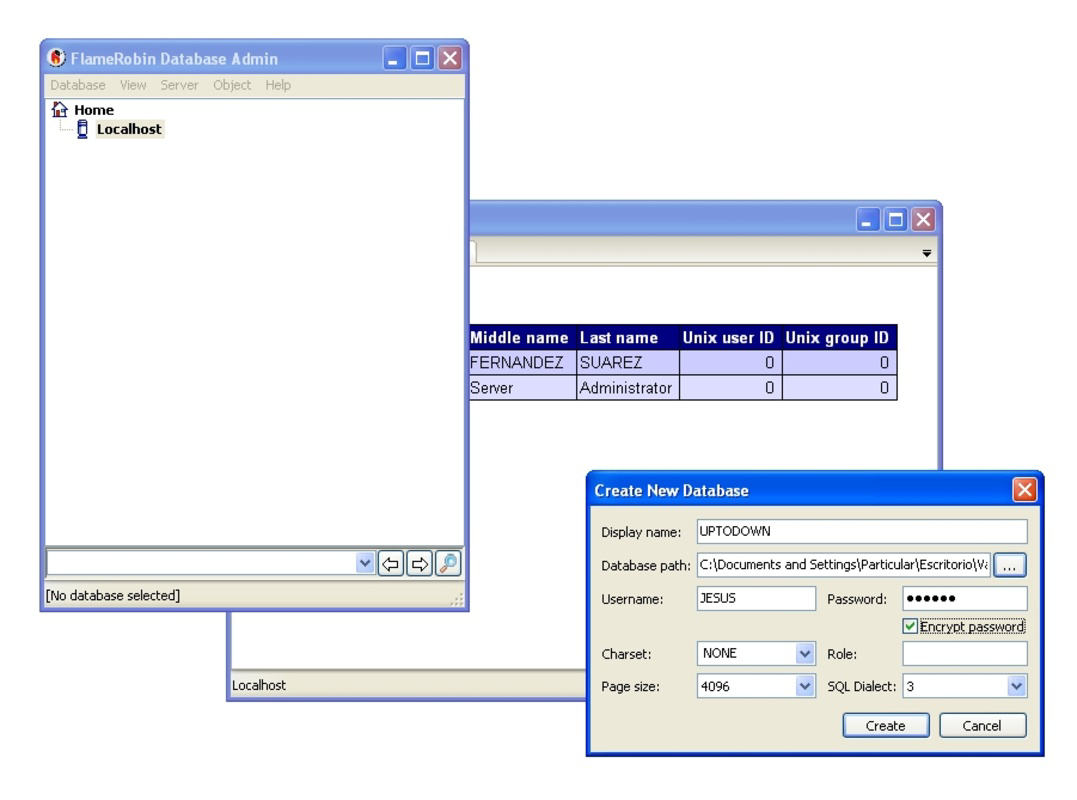
- Table Creation Tools: Users can create and modify tables, procedures, and triggers through a visual schema designer. This feature allows for drag-and-drop operations and real-time preview, making schema design more intuitive and less error-prone.
- Firebird Integration: FlameRobin is purpose-built for Firebird databases, ensuring deep compatibility and optimized performance. It leverages native Firebird features to deliver a seamless experience, avoiding the limitations of generic database tools.
For example, a developer working on a new application can use FlameRobin to create a database schema in minutes, test queries in the SQL editor, and assign user roles—all without leaving the application. Similarly, a database administrator can manage access rights and monitor performance metrics through the visual dashboard, improving operational efficiency.
Interface, UX & Performance
FlameRobin features a traditional desktop-style interface with a sidebar for database navigation, a central workspace for query execution, and a status bar for real-time feedback. The layout is logically structured, with clearly labeled menus and consistent iconography, contributing to a low cognitive load during use. Navigation is straightforward, with hierarchical views of databases, tables, and stored procedures that mirror standard database organization.
Usability is enhanced by responsive controls, instant query feedback, and minimal lag during routine operations. Although the developer did not list formal performance metrics, the application’s lightweight size of 14.5 MB suggests efficient resource usage. It is expected to run smoothly on modern Windows systems, including those with limited processing power. Stability appears consistent, given its long-standing operation since 2009. However, compatibility with newer Windows versions has not been explicitly confirmed, and users should verify system requirements before deployment.
Platform Compatibility & Technical Requirements
FlameRobin is available exclusively for the Windows platform. The current version is 0.9.3, with a file size of 14.5 MB. It is distributed as a free tool, requiring no purchase or subscription. The developer did not specify minimum OS requirements, so users should ensure their system meets general Windows compatibility standards for desktop applications. While the app is lightweight, its performance on older or low-end systems may vary without official documentation.
Users should note that FlameRobin is not available on mobile platforms such as Android or iOS. It is intended for desktop use and does not support touch-based interaction. The absence of mobile availability limits its use in field-based or remote database management scenarios. For users seeking a cross-platform solution, alternative tools may be necessary.
Pros and Cons
Pros
- Free to download and use with no hidden costs
- Intuitive GUI reduces reliance on command-line knowledge
- Comprehensive SQL editor with autocomplete and syntax highlighting
- Specifically optimized for Firebird database compatibility
- Lightweight installation at only 14.5 MB
Cons
- Not available on mobile platforms (Android, iOS)
- Developer did not provide detailed system requirements
- Latest version released in 2009; no recent updates reported
- Limited documentation and community support
- May not support newer Firebird database versions without verification
FAQ
Is FlameRobin safe to download and install?
Yes, FlameRobin is a free, open-source tool distributed through official channels. It does not include malware or unwanted components. However, users should always download from trusted sources to ensure authenticity.
Can I use FlameRobin on Windows 10 or Windows 11?
While the developer did not specify compatibility details, FlameRobin is expected to run on Windows 10 and Windows 11 systems due to its lightweight nature. Users are advised to test the application on their specific setup.
Does FlameRobin support the latest version of Firebird?
The developer did not confirm support for the most recent Firebird releases. Users should verify compatibility with their specific Firebird version before deployment.
Is FlameRobin available for Android or iOS?
No, FlameRobin is only available for Windows. It is not compatible with mobile operating systems such as Android or iOS.
How do I update FlameRobin?
As of now, the latest version is 0.9.3, released in 2009. The developer has not issued any recent updates. Users should monitor official sources for potential future releases.
Final Thoughts + CTA
FlameRobin remains a reliable and accessible tool for anyone managing Firebird databases on Windows. Its clean interface, powerful SQL editor, and specialized focus on Firebird make it a valuable asset for developers and administrators alike. While its lack of recent updates and mobile support may be limiting for some users, its core functionality continues to serve its niche effectively. For teams already invested in the Firebird ecosystem, FlameRobin offers a straightforward, no-cost solution to streamline database operations. If you're working with Firebird and prefer a visual approach over command-line tools, this app delivers real value.
Download FlameRobin now
Guides & Tutorials
How to install FlameRobin
- Click the Download button above.
- Once redirected, accept the terms and click Install.
- Wait for the FlameRobin download to finish on your device.
How to use FlameRobin
This software is primarily used for its core features described above. Open the app after installation to explore its capabilities.
User Reviews
No reviews yet. Be the first to share your experience.
You may also like
more
Que no te pillen¡
About !Que no te pillen¡Reviewed by Jason A. BilbreyShow MoreShow Less

3D Combat Zone
About 3D Combat ZoneOriginally released in 1983, 3D Combat Zone immerses players...

666: El día del portal
About 666: El día del portalOn June 6, 2006, Agent P. Stone uncovers a sinister...

80 in 1 Best Flash games
About 80 in 1 Best Flash games 80 in 1 Best Flash games is a collection of 80 fl...

ABYSS SEEKERーーWhat Do You See Deep in The Abyss
About ABYSS SEEKERーーWhat Do You See Deep in The AbyssIn ABYSS SEEKER, players...

ACA NEOGEO THE KING OF FIGHTERS 2002 for Windows
About ACA NEOGEO THE KING OF FIGHTERS 2002 for WindowsTHE KING OF FIGHTERS 2002,...